> ## Documentation Index
> Fetch the complete documentation index at: https://docs.bizaxl.com/llms.txt
> Use this file to discover all available pages before exploring further.
# Product catalog
> The multi-company product catalogue: choose a plan by insurer company and insurance type, and how an admin adds a product.
The product catalog is the shelf of plans your advisors sell. It spans many insurer
companies (such as LIC and HDFC Life) and many insurance types, and it holds the rules
each plan runs on: the eligible ages, the sum-assured band, how the premium is worked
out, the maturity return, and the commission rates. This page explains how to browse the
catalog and how an admin adds a product.
## Browsing the catalog
Open **Products** in the advisor portal. Advisors and admins both browse the same
catalog; admins can also create and edit plans.
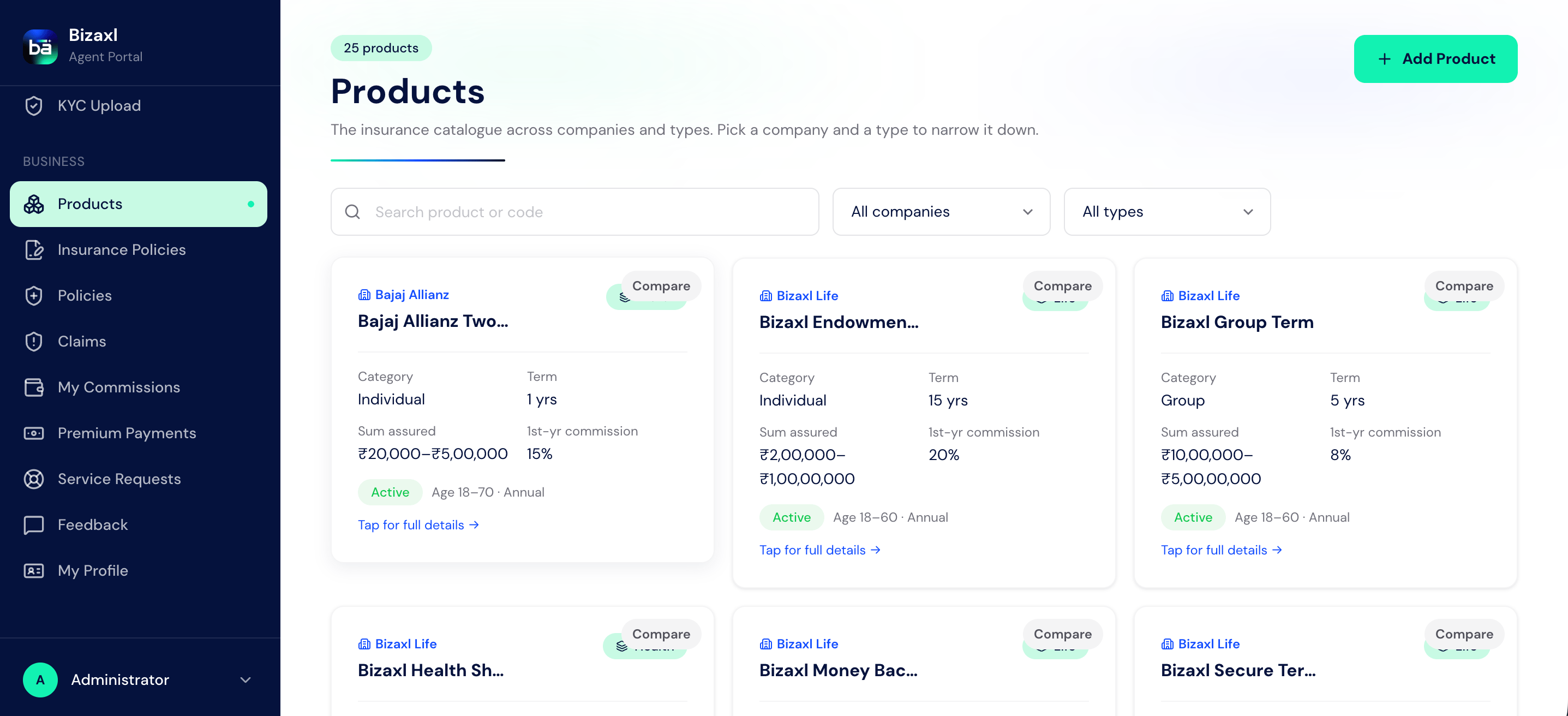 Narrow the list down two ways, and combine them with a keyword search:
Filter to a single company, such as LIC or HDFC Life. Each plan card shows the
company it belongs to.
Filter to a type of cover: Term Life, Endowment, ULIP, Money Back, Health, Personal
Accident, or Motor.
## Field guide: the product record
| Field | What it means |
| -------------------------------- | ------------------------------------------------------------------------------------------------ |
| Product Name | The plan's name. Required. |
| Product Code | The plan's short code. |
| Product Type | The insurance type: Term Life, Endowment, ULIP, Money Back, Health, Personal Accident, or Motor. |
| Policy Category | Individual or Group. Required. This drives whether premiums are GST-exempt or taxable. |
| Insurer Name | The insurer company behind the plan, for example LIC or HDFC Life. |
| Premium Frequency | Annual, Half-Yearly, Quarterly, Monthly, or Single. |
| Active | Whether the plan is available to sell. |
| Minimum Age / Maximum Age | The eligible age range for applicants. |
| Policy Term (Years) | The plan's term length. |
| Minimum / Maximum Sum Assured | The cover band the plan allows. |
| Base Premium Rate / Base Premium | The starting point for premium calculation. |
| Age Loading Per Year | How much the premium rises with the applicant's age. |
| Maturity Return Rate | The projected return used in illustrations. |
| First Year Commission Rate | The advisor's commission rate on the first premium. |
| Renewal Commission Rate | The advisor's commission rate on later premiums. |
| Enable Auto Calculation | Whether premiums and values are computed automatically from these rules. |
| HSN/SAC Code | The tax classification code for invoicing. |
| Billing Item | The item this plan invoices against in BAS. |
| Description | A short summary of the plan. |
## Adding a product (admin)
Creating and editing plans is an admin action.
From **Products**, choose to add a plan.
Pick the insurer company (for example LIC or HDFC Life) and the insurance type.
Both are required. You can pick an existing company from the suggestions or type a
new one.
Fill in the policy category, age range, sum-assured band, premium basis, maturity
return rate, and the first-year and renewal commission rates.
Add the HSN/SAC code and the billing item so payments on this plan invoice
correctly.
Mark the plan Active so advisors can select it in illustrations and applications.
The insurer company and the insurance type are both required when adding a plan. A
plan cannot be saved without them.
## Who does what
| Action | Responsible |
| ----------------------------- | ----------------- |
| Browse and filter the catalog | Advisor and admin |
| Create and edit a plan | Admin |
## Dependencies
* **What a plan needs to invoice cleanly:** an HSN/SAC code and a billing item, so
payments on the plan raise a correct invoice.
* **What the catalog feeds:** advisors select plans in Sales Illustrations,
E-Applications, and policies, and the plan's rates drive premium, maturity, and
commission calculations everywhere downstream. See
[Advisory tools](./advisory-tools) and
[Premiums and commissions](./premiums-and-commissions).
## Best practices
* **Keep companies named consistently.** Use one spelling per insurer (for example
always "HDFC Life") so the company filter groups plans cleanly.
* **Set commission rates carefully.** The first-year and renewal rates on the plan are
exactly what advisors earn on each payment, so get them right before activating.
* **Retire, don't delete.** When a plan is no longer sold, clear its Active flag rather
than removing it, so existing policies that reference it stay intact.
* **Fill in tax details up front.** A missing HSN/SAC code or billing item shows up
later as a broken invoice; set them when you create the plan.
Narrow the list down two ways, and combine them with a keyword search:
Filter to a single company, such as LIC or HDFC Life. Each plan card shows the
company it belongs to.
Filter to a type of cover: Term Life, Endowment, ULIP, Money Back, Health, Personal
Accident, or Motor.
## Field guide: the product record
| Field | What it means |
| -------------------------------- | ------------------------------------------------------------------------------------------------ |
| Product Name | The plan's name. Required. |
| Product Code | The plan's short code. |
| Product Type | The insurance type: Term Life, Endowment, ULIP, Money Back, Health, Personal Accident, or Motor. |
| Policy Category | Individual or Group. Required. This drives whether premiums are GST-exempt or taxable. |
| Insurer Name | The insurer company behind the plan, for example LIC or HDFC Life. |
| Premium Frequency | Annual, Half-Yearly, Quarterly, Monthly, or Single. |
| Active | Whether the plan is available to sell. |
| Minimum Age / Maximum Age | The eligible age range for applicants. |
| Policy Term (Years) | The plan's term length. |
| Minimum / Maximum Sum Assured | The cover band the plan allows. |
| Base Premium Rate / Base Premium | The starting point for premium calculation. |
| Age Loading Per Year | How much the premium rises with the applicant's age. |
| Maturity Return Rate | The projected return used in illustrations. |
| First Year Commission Rate | The advisor's commission rate on the first premium. |
| Renewal Commission Rate | The advisor's commission rate on later premiums. |
| Enable Auto Calculation | Whether premiums and values are computed automatically from these rules. |
| HSN/SAC Code | The tax classification code for invoicing. |
| Billing Item | The item this plan invoices against in BAS. |
| Description | A short summary of the plan. |
## Adding a product (admin)
Creating and editing plans is an admin action.
From **Products**, choose to add a plan.
Pick the insurer company (for example LIC or HDFC Life) and the insurance type.
Both are required. You can pick an existing company from the suggestions or type a
new one.
Fill in the policy category, age range, sum-assured band, premium basis, maturity
return rate, and the first-year and renewal commission rates.
Add the HSN/SAC code and the billing item so payments on this plan invoice
correctly.
Mark the plan Active so advisors can select it in illustrations and applications.
The insurer company and the insurance type are both required when adding a plan. A
plan cannot be saved without them.
## Who does what
| Action | Responsible |
| ----------------------------- | ----------------- |
| Browse and filter the catalog | Advisor and admin |
| Create and edit a plan | Admin |
## Dependencies
* **What a plan needs to invoice cleanly:** an HSN/SAC code and a billing item, so
payments on the plan raise a correct invoice.
* **What the catalog feeds:** advisors select plans in Sales Illustrations,
E-Applications, and policies, and the plan's rates drive premium, maturity, and
commission calculations everywhere downstream. See
[Advisory tools](./advisory-tools) and
[Premiums and commissions](./premiums-and-commissions).
## Best practices
* **Keep companies named consistently.** Use one spelling per insurer (for example
always "HDFC Life") so the company filter groups plans cleanly.
* **Set commission rates carefully.** The first-year and renewal rates on the plan are
exactly what advisors earn on each payment, so get them right before activating.
* **Retire, don't delete.** When a plan is no longer sold, clear its Active flag rather
than removing it, so existing policies that reference it stay intact.
* **Fill in tax details up front.** A missing HSN/SAC code or billing item shows up
later as a broken invoice; set them when you create the plan.