> ## Documentation Index
> Fetch the complete documentation index at: https://docs.bizaxl.com/llms.txt
> Use this file to discover all available pages before exploring further.
# Policy register
> The direct policy register for capturing Motor, Life, Health, Workmen's Compensation, and SME policies, including uploading a policy PDF to pre-fill the form, nominees, bank details, and installment tracking.
The policy register is where an advisor records a policy that was placed directly across
a line of business: Motor, Life, Health, Workmen's Compensation (WC), or SME. It sits
alongside the application-to-policy flow and is built for the day-to-day book an agency
already writes with insurers. Each line of business has its own tailored form so you
capture exactly the details that line needs, and you can upload the insurer's policy PDF
to pre-fill much of it. This page covers the register, the five policy types, and the
fields common to all of them.
## Opening the register
Open **Policy Register** in the advisor portal. You land on a summary of the policies you
have captured, grouped by line of business, with the count and premium written under each.
From here you start a new policy in any of the five lines, or open an existing one to view
or edit it.
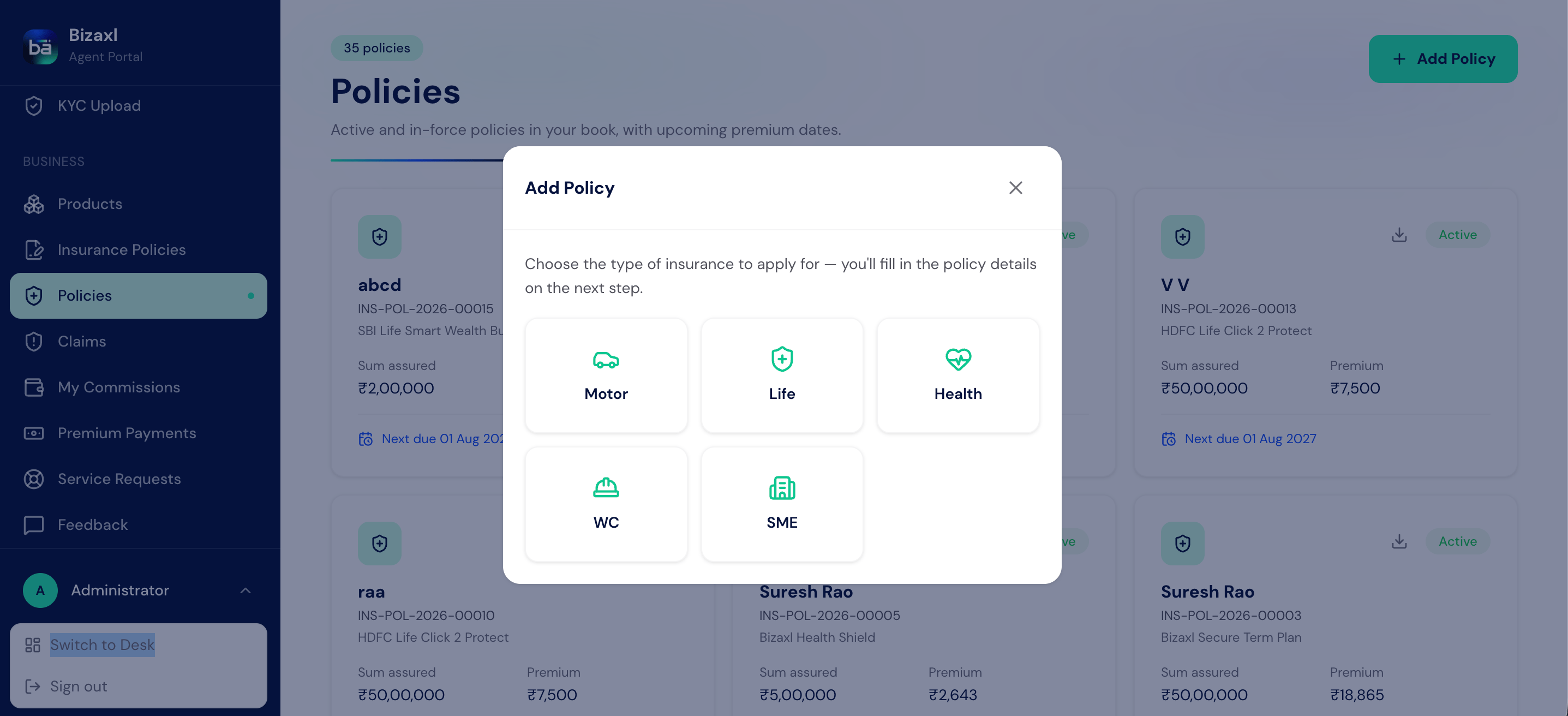 Private car, two-wheeler, and commercial vehicle cover, with IDV, add-ons, and permit
validity.
Term, endowment, ULIP, and other life plans, with sum assured, term, and maturity
benefit.
Individual, family floater, and group health cover, with the sum insured and covered
members.
Employer liability cover, priced on the wage bill and the nature of work.
Business-package cover for a shop, office, or establishment, with fire, burglary, and
liability options.
## Uploading a policy PDF to pre-fill the form
Rather than key everything in, you can attach the insurer's policy PDF and let the system
read the common details from it. Review what it reads back, correct anything that needs
it, and complete the rest by hand.
Choose the line of business (for example Motor) and open a new form.
Attach the insurer's PDF in the upload field. The system reads the details it can
recognize and fills them into the matching fields.
Check the pre-filled values against the document, fix anything that came across wrong,
and fill in the fields the PDF did not cover.
Save it as a Draft while you finish, then set it Active once the record is complete.
Reading a PDF is a convenience, not a substitute for checking. Always confirm the
premium figures, the policy number, and the start and end dates against the document
before you set the policy Active.
## Field guide: the details every line shares
Every policy in the register, whatever the line, opens with the same client, agent, and
policy blocks, and closes with the same payment and status blocks.
| Field | What to enter | Required? |
| ---------------------------- | ------------------------------------------------------------------------------ | --------- |
| Client Name | The client this policy is for, chosen from your clients. | Yes |
| Policy Holder | The name of the person or entity holding the policy. | Yes |
| Sub Agent | The advisor who placed the policy. | Yes |
| Insurance Company Name | The insurer behind the policy. | Yes |
| Agency Code | The agency code the business was written under, if any. | No |
| Broker Code | The broker code the business was written under, if any. | No |
| Policy Number | The insurer's policy number. | Yes |
| Policy Start Date / End Date | When cover starts and ends. | Yes |
| Premium Amount / Net Premium | The premium before tax. | Yes |
| GST Amount | The tax added to the premium. | Yes |
| Total Premium | The premium plus tax: what the client pays. | Yes |
| Status | Draft while you complete it, then Active. Later Expired, Lapsed, or Cancelled. | Yes |
### Nominees and bank details
Most lines carry a **Nominees** table (name, relationship, and share, with shares totalling
100%) and a **Bank Details** table for the account a claim or maturity is paid into. Motor,
Life, and Health capture nominees; every line captures bank details.
### Payment management and installments
Each policy has a payment block for tracking what the client owes and has paid, so you can
run a policy on installments without a separate schedule.
| Field | What to enter | Required? |
| ----------------------- | ------------------------------------------------------------------- | --------- |
| Total Amount | The full amount payable on the policy. | No |
| Premium Discount Amount | Any discount applied. | No |
| Amount Received | What the client has paid so far. | No |
| Amount Remaining | What is still owed (the balance). | No |
| Payment Date | When the latest payment came in. | No |
| Payment Method | Cash, Cheque, UPI, Card, Net Banking, or Other. | No |
| Next Premium Date | When the next payment falls due. | No |
| Payment Installments | A row per part-payment received, with its date, amount, and method. | No |
## Motor policy
The motor form captures the vehicle, the cover type, the add-ons, and the many validity
dates a commercial vehicle needs.
| Field | What to enter | Required? |
| --------------------------------- | -------------------------------------------------------------------------------------------------------------------------------------------------------------------------------------------------------------------------------- | --------- |
| Vehicle Type | New Vehicle or Old Vehicle. | Yes |
| Class of Vehicle | Private Car, Two Wheeler, Goods Carrying, Passenger Carrying, or Miscellaneous. | Yes |
| Insurance Type | Comprehensive, Third Party, Own Damage, or Bundled. | Yes |
| Registration Number / RTO | The vehicle's registration and RTO. | Yes |
| TP Premium | The third-party portion of the premium. | Yes |
| Vehicle IDV / CNG IDV / Total IDV | The insured declared value of the vehicle (and CNG kit, if fitted). | No |
| Make / Model / Variant / MFY | The vehicle's make, model, variant, and year of manufacture. | No |
| NCB | The no-claim bonus percentage carried over. | No |
| Add-ons and optional covers | A long checklist of covers you can add: zero depreciation, return to invoice, roadside assistance, engine protector, consumables, tyre guard, personal accident, NCB protection, and many more. Tick the ones the client bought. | No |
| Registration and permit validity | Start and end dates for fitness, state and national permit, RTO tax, PUC, and RC, for commercial vehicles. | No |
| PayOut OD / TP / Net | The commission payout percentages on the own-damage, third-party, and net premium. | No |
## Life policy
| Field | What to enter | Required? |
| ----------------------------------------------- | ---------------------------------------------------------------------- | --------- |
| Plan Name | The life plan's name. | Yes |
| Policy Type | Term, Endowment, Whole Life, ULIP, Money Back, Pension, or Child Plan. | Yes |
| Commencement Date / Maturity Date | When the plan starts and matures. | Yes |
| Sum Assured | The cover amount. | Yes |
| Policy Term / Premium Payment Term (Years) | How long cover runs and how long premiums are paid. | No |
| Maturity / Assured Benefit | The projected benefit at maturity. | No |
| Life Assured Name / DOB / Gender / Age at Entry | Who the life cover is on and their details. | No |
| Medical Underwriting Done | Whether the medicals were completed. | No |
| First-Year / Renewal Commission % | The commission rates on this policy. | No |
## Health policy
| Field | What to enter | Required? |
| --------------------------------------------- | ------------------------------------------------------------------------------- | --------- |
| Plan Name | The health plan's name. | Yes |
| Policy Type | Individual, Family Floater, Group, Senior Citizen, Critical Illness, or Top-Up. | Yes |
| Sum Insured | The cover amount. | Yes |
| Cover Type | Individual or Family Floater. | No |
| Number of Members | How many people are covered. | No |
| Room Rent Limit / Co-Pay % / No-Claim Bonus % | The plan's room-rent cap, co-pay, and bonus. | No |
| Pre-existing Waiting (Years) | The waiting period for pre-existing conditions. | No |
| Restore Benefit / Maternity / OPD Cover | Optional benefits, ticked when included. | No |
| Covered Members | A row per insured member, with their pre-existing conditions. | No |
## Workmen's Compensation (WC) policy
| Field | What to enter | Required? |
| -------------------------------------------- | ------------------------------------------------ | --------- |
| Employer / Establishment Name | The employer being covered. | No |
| Policy Type | WC Act Only, Common Law, or WC Act + Common Law. | Yes |
| Number of Employees | How many employees are covered. | Yes |
| Total Annual Wage Bill | The wage bill the premium is priced on. | Yes |
| Premium Rate (per 100 wages) | The rate applied to the wage bill. | No |
| Nature of Work / Risk Classification | What the business does and its risk band. | No |
| Medical Expense / Occupational Disease Cover | Optional extensions, ticked when included. | No |
## SME policy
| Field | What to enter | Required? |
| --------------------------------------------------- | ------------------------------------------------------------------------------------------------------------------------------- | --------- |
| Business / Establishment Name | The business being covered. | No |
| Business Type | Retail, Manufacturing, Services, Trading, Hospitality, Warehouse, Office, or Other. | Yes |
| Coverage Bundle | Fire & Allied Perils, Burglary, Business Package, Shopkeepers Package, Office Package, Marine Transit, or Commercial Liability. | No |
| Total Sum Insured | The overall cover. | Yes |
| Building / Stock / Plant & Machinery Sum Insured | The cover split across assets. | No |
| Number of Locations / Insured Locations | How many premises are covered, and where. | No |
| Fire / Burglary / Liability / Business Interruption | The perils covered, ticked when included. | No |
## Downloading a register policy
Once a policy is captured you can download it as a PDF report from its form, to send to
the client or file with the paperwork. Keep the policy PDF attached to the record so the
document and the data stay together.
## Who does what
| Action | Responsible |
| ----------------------------------------------------- | ---------------------------- |
| Capture and edit a register policy | Advisor (for their own book) |
| See and manage every advisor's register policies | Admin |
| Upload the policy PDF and check the pre-filled values | Advisor |
| Record installment payments on the policy | Advisor or admin |
## Dependencies
* **Before you capture a policy:** the client must exist as a record, and the insurer,
and any agency or broker code, should be set up so you can select them. See
[Product catalog](./product-catalog) for the master data.
* **What the register needs:** the insurer's policy details (number, dates, premium) and,
ideally, the policy PDF to read them from.
* **What the register feeds:** the captured policy is your source of truth for that line
of business, and its payment block tracks what the client owes and has paid.
## Best practices
* **Upload the PDF first.** Reading the insurer's document in pre-fills the tedious fields
and cuts keying errors, so start there and correct rather than type from scratch.
* **Keep it Draft until it is complete.** Set a policy Active only when the number, dates,
premium, and nominees are all confirmed against the document.
* **Get nominee shares to 100%.** As everywhere in the product, nominee shares must total
exactly 100%, and a minor nominee needs an appointee.
* **Reconcile the payment block.** Keep Amount Received and Amount Remaining current as
installments come in, so the balance owed is always accurate.
* **Name insurers and codes consistently.** Use one spelling per insurer, agency code, and
broker code so the register groups and totals cleanly.
Private car, two-wheeler, and commercial vehicle cover, with IDV, add-ons, and permit
validity.
Term, endowment, ULIP, and other life plans, with sum assured, term, and maturity
benefit.
Individual, family floater, and group health cover, with the sum insured and covered
members.
Employer liability cover, priced on the wage bill and the nature of work.
Business-package cover for a shop, office, or establishment, with fire, burglary, and
liability options.
## Uploading a policy PDF to pre-fill the form
Rather than key everything in, you can attach the insurer's policy PDF and let the system
read the common details from it. Review what it reads back, correct anything that needs
it, and complete the rest by hand.
Choose the line of business (for example Motor) and open a new form.
Attach the insurer's PDF in the upload field. The system reads the details it can
recognize and fills them into the matching fields.
Check the pre-filled values against the document, fix anything that came across wrong,
and fill in the fields the PDF did not cover.
Save it as a Draft while you finish, then set it Active once the record is complete.
Reading a PDF is a convenience, not a substitute for checking. Always confirm the
premium figures, the policy number, and the start and end dates against the document
before you set the policy Active.
## Field guide: the details every line shares
Every policy in the register, whatever the line, opens with the same client, agent, and
policy blocks, and closes with the same payment and status blocks.
| Field | What to enter | Required? |
| ---------------------------- | ------------------------------------------------------------------------------ | --------- |
| Client Name | The client this policy is for, chosen from your clients. | Yes |
| Policy Holder | The name of the person or entity holding the policy. | Yes |
| Sub Agent | The advisor who placed the policy. | Yes |
| Insurance Company Name | The insurer behind the policy. | Yes |
| Agency Code | The agency code the business was written under, if any. | No |
| Broker Code | The broker code the business was written under, if any. | No |
| Policy Number | The insurer's policy number. | Yes |
| Policy Start Date / End Date | When cover starts and ends. | Yes |
| Premium Amount / Net Premium | The premium before tax. | Yes |
| GST Amount | The tax added to the premium. | Yes |
| Total Premium | The premium plus tax: what the client pays. | Yes |
| Status | Draft while you complete it, then Active. Later Expired, Lapsed, or Cancelled. | Yes |
### Nominees and bank details
Most lines carry a **Nominees** table (name, relationship, and share, with shares totalling
100%) and a **Bank Details** table for the account a claim or maturity is paid into. Motor,
Life, and Health capture nominees; every line captures bank details.
### Payment management and installments
Each policy has a payment block for tracking what the client owes and has paid, so you can
run a policy on installments without a separate schedule.
| Field | What to enter | Required? |
| ----------------------- | ------------------------------------------------------------------- | --------- |
| Total Amount | The full amount payable on the policy. | No |
| Premium Discount Amount | Any discount applied. | No |
| Amount Received | What the client has paid so far. | No |
| Amount Remaining | What is still owed (the balance). | No |
| Payment Date | When the latest payment came in. | No |
| Payment Method | Cash, Cheque, UPI, Card, Net Banking, or Other. | No |
| Next Premium Date | When the next payment falls due. | No |
| Payment Installments | A row per part-payment received, with its date, amount, and method. | No |
## Motor policy
The motor form captures the vehicle, the cover type, the add-ons, and the many validity
dates a commercial vehicle needs.
| Field | What to enter | Required? |
| --------------------------------- | -------------------------------------------------------------------------------------------------------------------------------------------------------------------------------------------------------------------------------- | --------- |
| Vehicle Type | New Vehicle or Old Vehicle. | Yes |
| Class of Vehicle | Private Car, Two Wheeler, Goods Carrying, Passenger Carrying, or Miscellaneous. | Yes |
| Insurance Type | Comprehensive, Third Party, Own Damage, or Bundled. | Yes |
| Registration Number / RTO | The vehicle's registration and RTO. | Yes |
| TP Premium | The third-party portion of the premium. | Yes |
| Vehicle IDV / CNG IDV / Total IDV | The insured declared value of the vehicle (and CNG kit, if fitted). | No |
| Make / Model / Variant / MFY | The vehicle's make, model, variant, and year of manufacture. | No |
| NCB | The no-claim bonus percentage carried over. | No |
| Add-ons and optional covers | A long checklist of covers you can add: zero depreciation, return to invoice, roadside assistance, engine protector, consumables, tyre guard, personal accident, NCB protection, and many more. Tick the ones the client bought. | No |
| Registration and permit validity | Start and end dates for fitness, state and national permit, RTO tax, PUC, and RC, for commercial vehicles. | No |
| PayOut OD / TP / Net | The commission payout percentages on the own-damage, third-party, and net premium. | No |
## Life policy
| Field | What to enter | Required? |
| ----------------------------------------------- | ---------------------------------------------------------------------- | --------- |
| Plan Name | The life plan's name. | Yes |
| Policy Type | Term, Endowment, Whole Life, ULIP, Money Back, Pension, or Child Plan. | Yes |
| Commencement Date / Maturity Date | When the plan starts and matures. | Yes |
| Sum Assured | The cover amount. | Yes |
| Policy Term / Premium Payment Term (Years) | How long cover runs and how long premiums are paid. | No |
| Maturity / Assured Benefit | The projected benefit at maturity. | No |
| Life Assured Name / DOB / Gender / Age at Entry | Who the life cover is on and their details. | No |
| Medical Underwriting Done | Whether the medicals were completed. | No |
| First-Year / Renewal Commission % | The commission rates on this policy. | No |
## Health policy
| Field | What to enter | Required? |
| --------------------------------------------- | ------------------------------------------------------------------------------- | --------- |
| Plan Name | The health plan's name. | Yes |
| Policy Type | Individual, Family Floater, Group, Senior Citizen, Critical Illness, or Top-Up. | Yes |
| Sum Insured | The cover amount. | Yes |
| Cover Type | Individual or Family Floater. | No |
| Number of Members | How many people are covered. | No |
| Room Rent Limit / Co-Pay % / No-Claim Bonus % | The plan's room-rent cap, co-pay, and bonus. | No |
| Pre-existing Waiting (Years) | The waiting period for pre-existing conditions. | No |
| Restore Benefit / Maternity / OPD Cover | Optional benefits, ticked when included. | No |
| Covered Members | A row per insured member, with their pre-existing conditions. | No |
## Workmen's Compensation (WC) policy
| Field | What to enter | Required? |
| -------------------------------------------- | ------------------------------------------------ | --------- |
| Employer / Establishment Name | The employer being covered. | No |
| Policy Type | WC Act Only, Common Law, or WC Act + Common Law. | Yes |
| Number of Employees | How many employees are covered. | Yes |
| Total Annual Wage Bill | The wage bill the premium is priced on. | Yes |
| Premium Rate (per 100 wages) | The rate applied to the wage bill. | No |
| Nature of Work / Risk Classification | What the business does and its risk band. | No |
| Medical Expense / Occupational Disease Cover | Optional extensions, ticked when included. | No |
## SME policy
| Field | What to enter | Required? |
| --------------------------------------------------- | ------------------------------------------------------------------------------------------------------------------------------- | --------- |
| Business / Establishment Name | The business being covered. | No |
| Business Type | Retail, Manufacturing, Services, Trading, Hospitality, Warehouse, Office, or Other. | Yes |
| Coverage Bundle | Fire & Allied Perils, Burglary, Business Package, Shopkeepers Package, Office Package, Marine Transit, or Commercial Liability. | No |
| Total Sum Insured | The overall cover. | Yes |
| Building / Stock / Plant & Machinery Sum Insured | The cover split across assets. | No |
| Number of Locations / Insured Locations | How many premises are covered, and where. | No |
| Fire / Burglary / Liability / Business Interruption | The perils covered, ticked when included. | No |
## Downloading a register policy
Once a policy is captured you can download it as a PDF report from its form, to send to
the client or file with the paperwork. Keep the policy PDF attached to the record so the
document and the data stay together.
## Who does what
| Action | Responsible |
| ----------------------------------------------------- | ---------------------------- |
| Capture and edit a register policy | Advisor (for their own book) |
| See and manage every advisor's register policies | Admin |
| Upload the policy PDF and check the pre-filled values | Advisor |
| Record installment payments on the policy | Advisor or admin |
## Dependencies
* **Before you capture a policy:** the client must exist as a record, and the insurer,
and any agency or broker code, should be set up so you can select them. See
[Product catalog](./product-catalog) for the master data.
* **What the register needs:** the insurer's policy details (number, dates, premium) and,
ideally, the policy PDF to read them from.
* **What the register feeds:** the captured policy is your source of truth for that line
of business, and its payment block tracks what the client owes and has paid.
## Best practices
* **Upload the PDF first.** Reading the insurer's document in pre-fills the tedious fields
and cuts keying errors, so start there and correct rather than type from scratch.
* **Keep it Draft until it is complete.** Set a policy Active only when the number, dates,
premium, and nominees are all confirmed against the document.
* **Get nominee shares to 100%.** As everywhere in the product, nominee shares must total
exactly 100%, and a minor nominee needs an appointee.
* **Reconcile the payment block.** Keep Amount Received and Amount Remaining current as
installments come in, so the balance owed is always accurate.
* **Name insurers and codes consistently.** Use one spelling per insurer, agency code, and
broker code so the register groups and totals cleanly.