> ## Documentation Index
> Fetch the complete documentation index at: https://docs.bizaxl.com/llms.txt
> Use this file to discover all available pages before exploring further.
# Kitchen Display
> How the kitchen team works the live order board in BIZ Cafe - seeing new orders and advancing them through preparing and ready, with the customer notified when ready.
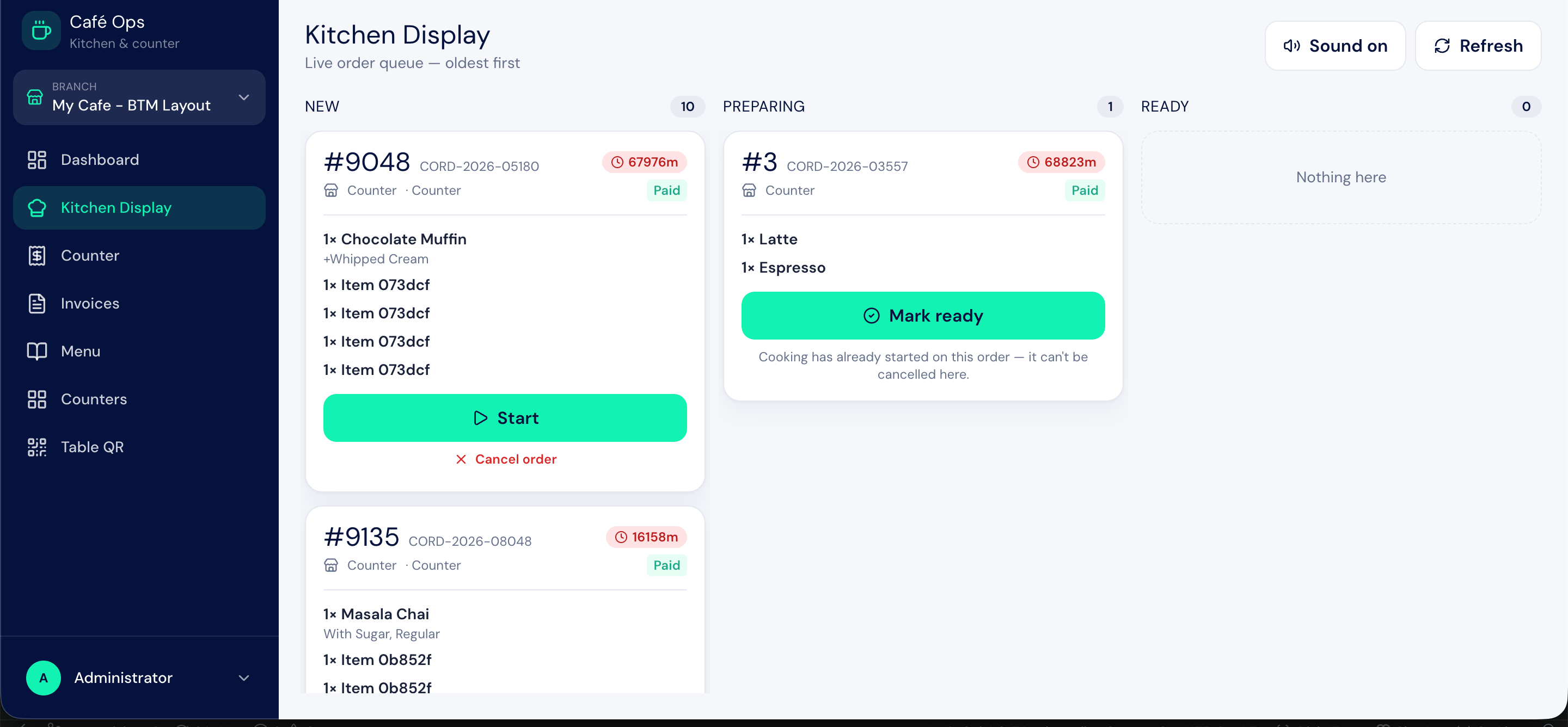
The kitchen display is a live board that shows the kitchen team what to make and in what order. It runs at `/cafe-ops/kitchen` and updates as new orders come in from the storefront and the counter. This page covers how the kitchen works the board.
 ***
## Who Uses This Feature
| Role | What They Do Here |
| ---------------- | ------------------------------------------------------------------------------------------- |
| **Cafe Kitchen** | Watches the board, prepares orders, and advances them through preparing and ready |
| **Cafe Cashier** | Can also open the kitchen display, for example to check progress on an order at the counter |
| **Cafe Admin** | Has full access to the kitchen display |
The Cafe Kitchen role is limited to the kitchen display only; it is the single screen this role needs.
***
## What the Board Shows
Each order appears as a card with its **token number**, the **items** to prepare (including any modifier choices and add-ons the guest selected), and the **order notes** if the guest left any. The card shows the order's current status and gives the kitchen the controls to advance it.
Orders arrive on the board once they are confirmed:
* Storefront orders paid online arrive when payment completes.
* Counter orders and pay-at-counter orders arrive when they are placed.
***
## Working an Order
A confirmed order shows on the board with the status `New`. The kitchen reads the items and notes.
When the kitchen begins making the order, they advance it to `Preparing`. This tells everyone the order is in progress.
When the order is made and ready to collect, the kitchen advances it to `Ready`. The customer is automatically notified that their order is ready.
Reaching `Ready` is what triggers the customer notification, so only mark an order ready when it is genuinely ready to hand over.
For the full set of order statuses and what each means, see [The Order Journey](/hospitality-leisure/cafe/workflow).
***
## The Kitchen Ticket
If you prefer a printed docket alongside the screen, BIZ Cafe produces a **Cafe Kitchen Ticket** print format describing what to prepare. Use it where a physical ticket fits your kitchen workflow better than the screen alone.
***
## Upstream and Downstream Dependencies
* The kitchen display **depends on orders** being placed, from either the storefront or the counter.
* Advancing an order to `Ready` **feeds the customer notification** and signals the counter that the order can be handed over and billed.
***
## Best Practices
* **Keep the board on a dedicated screen.** A wall-mounted display the whole kitchen can see beats checking a phone.
* **Advance statuses in real time.** The board is only useful if it reflects reality; move orders to `Preparing` and `Ready` as they happen.
* **Read the order notes.** Guests use notes for allergies and special requests, so check them before starting.
* **Do not mark ready early.** The customer is notified at `Ready`, and an early notification means a guest arriving to wait.
***
## Who Uses This Feature
| Role | What They Do Here |
| ---------------- | ------------------------------------------------------------------------------------------- |
| **Cafe Kitchen** | Watches the board, prepares orders, and advances them through preparing and ready |
| **Cafe Cashier** | Can also open the kitchen display, for example to check progress on an order at the counter |
| **Cafe Admin** | Has full access to the kitchen display |
The Cafe Kitchen role is limited to the kitchen display only; it is the single screen this role needs.
***
## What the Board Shows
Each order appears as a card with its **token number**, the **items** to prepare (including any modifier choices and add-ons the guest selected), and the **order notes** if the guest left any. The card shows the order's current status and gives the kitchen the controls to advance it.
Orders arrive on the board once they are confirmed:
* Storefront orders paid online arrive when payment completes.
* Counter orders and pay-at-counter orders arrive when they are placed.
***
## Working an Order
A confirmed order shows on the board with the status `New`. The kitchen reads the items and notes.
When the kitchen begins making the order, they advance it to `Preparing`. This tells everyone the order is in progress.
When the order is made and ready to collect, the kitchen advances it to `Ready`. The customer is automatically notified that their order is ready.
Reaching `Ready` is what triggers the customer notification, so only mark an order ready when it is genuinely ready to hand over.
For the full set of order statuses and what each means, see [The Order Journey](/hospitality-leisure/cafe/workflow).
***
## The Kitchen Ticket
If you prefer a printed docket alongside the screen, BIZ Cafe produces a **Cafe Kitchen Ticket** print format describing what to prepare. Use it where a physical ticket fits your kitchen workflow better than the screen alone.
***
## Upstream and Downstream Dependencies
* The kitchen display **depends on orders** being placed, from either the storefront or the counter.
* Advancing an order to `Ready` **feeds the customer notification** and signals the counter that the order can be handed over and billed.
***
## Best Practices
* **Keep the board on a dedicated screen.** A wall-mounted display the whole kitchen can see beats checking a phone.
* **Advance statuses in real time.** The board is only useful if it reflects reality; move orders to `Preparing` and `Ready` as they happen.
* **Read the order notes.** Guests use notes for allergies and special requests, so check them before starting.
* **Do not mark ready early.** The customer is notified at `Ready`, and an early notification means a guest arriving to wait.